All work
CASE STUDY · MSc COURSEWORK · MIXED REALITY
CAMPUS QUEST
Can a campus teach its own history? A location-based trivia game where the buildings are the clues.
PROBLEM
People walk past Jubilee Campus buildings every day without knowing who they are named after or why they matter.
MY ROLE
Solo project: research, concept, game script, Artcodes, interface design, prototype and on-site testing.
METHODS
Site visits and desk research, ideation cards, storyboarding, Figma and Artcodes prototype, Wizard of Oz audio, field testing.
TIMELINE & TOOLS
Jan to May 2023, MSc HCI, University of Nottingham · Figma, Artcodes, Sketchbook, text-to-speech
4
hand-drawn Artcodes, three of them real campus buildings
13
frames in a clickable Figma prototype
1
participant tested on site, with consent
2
issues found: slow response and failed scans
Open Figma prototype

ON THIS PAGE
The brief
Research
Ideation
Player journey
The design
Decisions
Artcodes
Building it
Testing
Reflection
THE BRIEF
The module asked for a working mixed reality prototype, built without writing code, that blends a physical place with a digital layer. I chose Jubilee Campus at the University of Nottingham and designed around locative media: the real campus carries the experience, and the phone adds the story.
Campus Quest is a scavenger hunt. Players walk between real buildings, scan a code at each one, listen to a short audio clip about its history, and answer a question to unlock the next location.
WHO IT IS FOR
New students getting to know the campus they will spend years on
Visitors such as families and international guests, for whom the game doubles as a friendly introduction to the university
CONSTRAINTS
No programming: everything had to work with design tools and off-the-shelf apps
A real campus: codes had to be easy to spot, a sensible walk apart, and not get in anyone’s way
Figma prototypes can’t play audio
One person doing research, content, design and testing
GETTING TO KNOW THE SITE
I visited Jubilee Campus several times to study its buildings, open spaces, landmarks and daily routines, then filled the gaps with desk research: the university website, campus maps and virtual tours. I was looking for two things: what makes the place worth exploring, and what could get in the way of a game played on it.
What I found
What it meant for the design
The campus sits on the former Raleigh bicycle factory site and its buildings are named after people with a story
History becomes the content: each stop tells the story behind a building’s name
Award-winning modern architecture, a lake and green spaces
Landmarks are easy to recognise, so the route and the codes can be built around them
Families, international visitors and prospective students are a natural audience, and the game could double as a marketing tool
Content has to make sense to someone who has never been on campus
Risks: accessibility for all players, balancing learning with fun, puzzle difficulty, and disrupting people who study and work there
Keep puzzles short, give clear instructions, and keep the route to a few stops
FROM IDEA TO STORYBOARD
I used the module’s Mixed Reality Game Cards to test the concept from three angles: Opportunity cards to build on, Question cards the design had to answer, and Challenge cards to plan for. These are the twelve I chose.


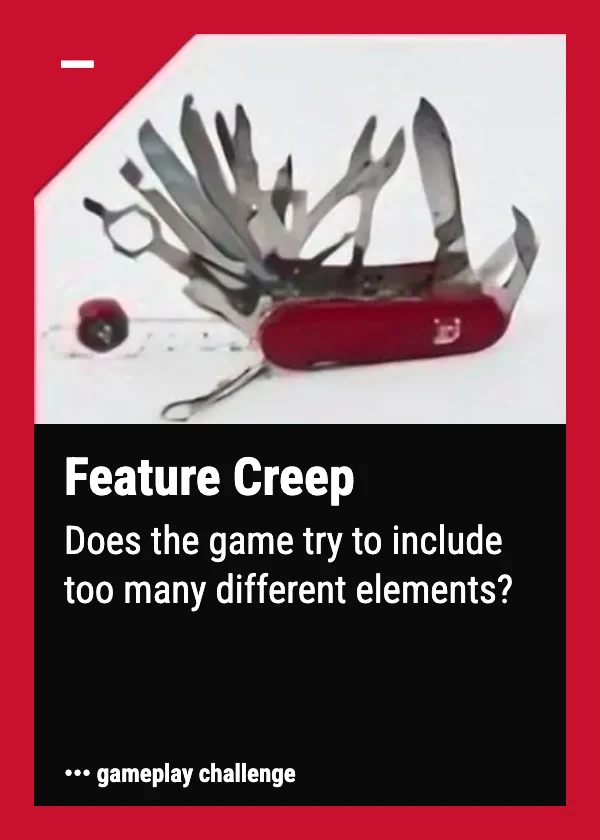


The twelve ideation cards I used: four Opportunity, four Question and four Challenge cards (hover to pause)
WHAT EACH SET OF CARDS DID
Opportunity cards (Alternate Reality, Collaboration, Exploration, Strong Narrative) shaped the core idea: a story-led quest played on the real campus.
Question cards (Beginning and End?, Core Concepts?, Experience Flow?, Theme and Story?) set where the game starts and ends, and how it flows from stop to stop.
Challenge cards (Unclear Instructions, Feature Creep, Disruption, Noise) led to instructions at the start, a short route, quieter spots, and plans for subtitles.
STORYBOARD
My storyboard: eight scenes

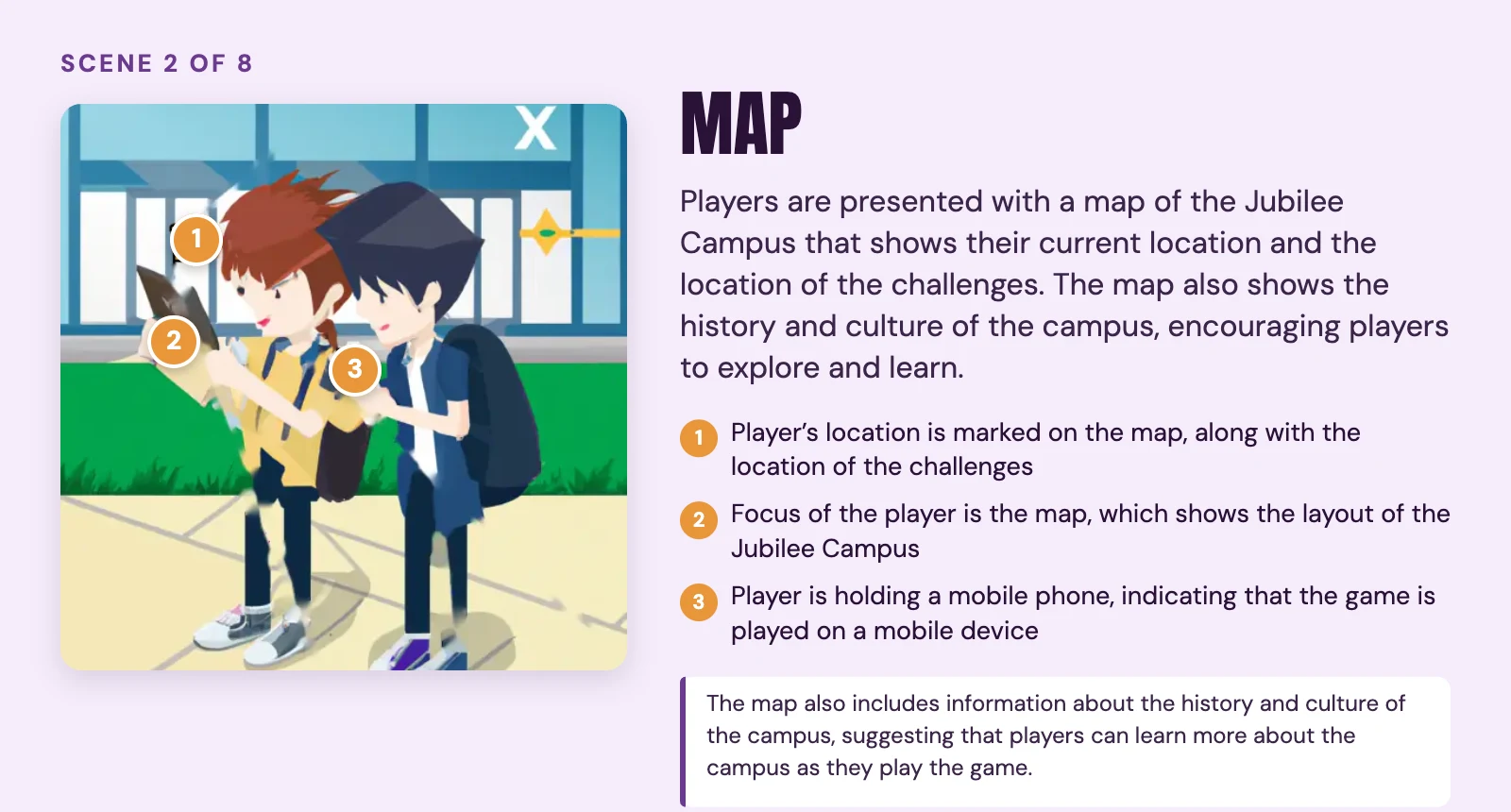

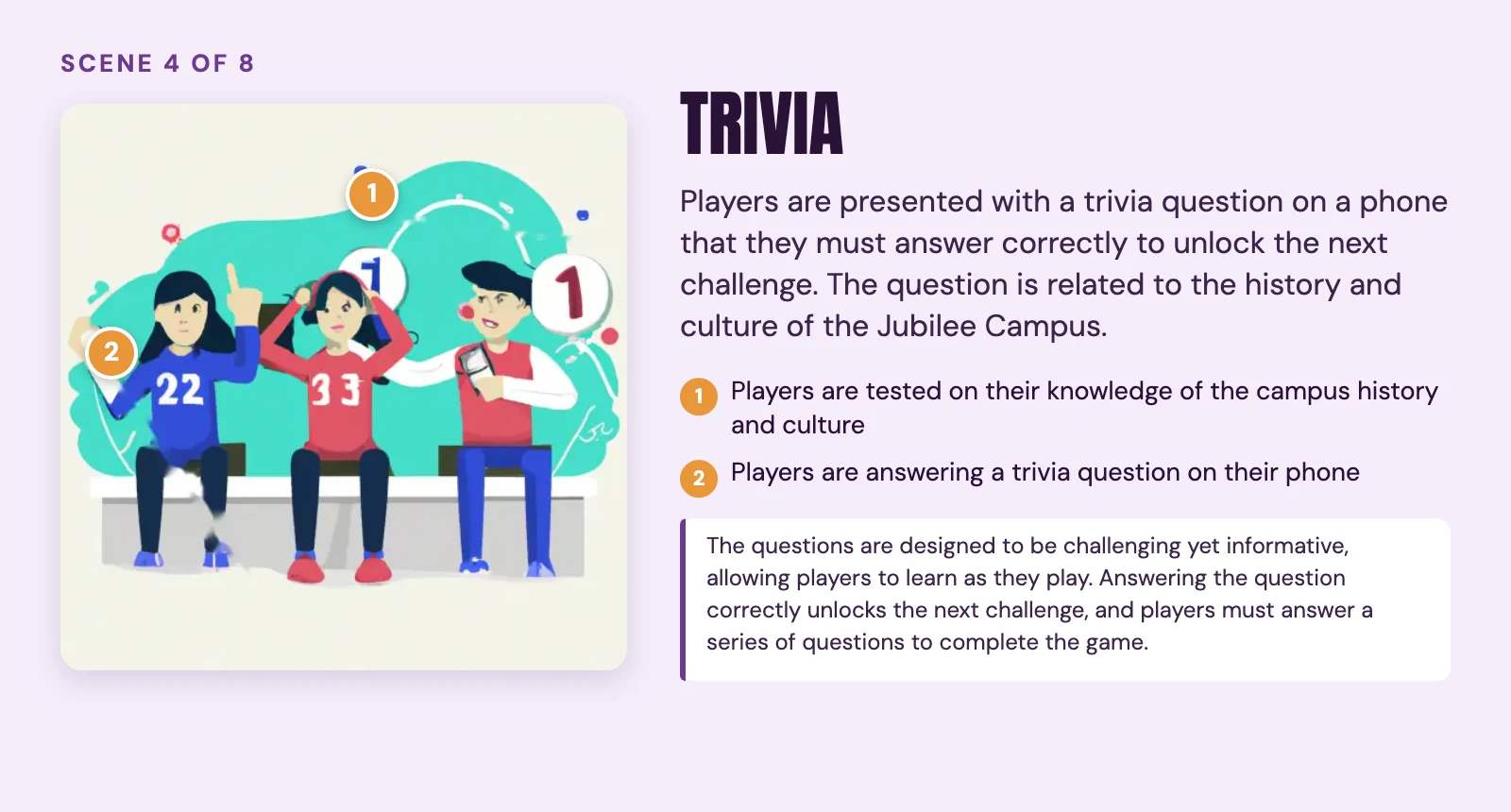


My storyboard, scene by scene. Use the arrows to move between scenes, or hover to pause.
The storyboard imagined more than I built. When it came to building, I kept the core loop (introduction, puzzles, trivia, locative media and a conclusion) and left the map, the mystery and multiplayer for later, which is exactly what the Feature Creep card warned about.
THE PLAYER JOURNEY
Here is the hunt from the player’s side: what they do at each stage, and which screens support them.
Stage
What the player does
Screens
Get started at the campus entrance
Opens the game, chooses a difficulty and reads how to play
Start, Difficulty, Instructions
Find the next building
Listens to the clue and walks to the named building, looking for its Artcode
Audio clue
Scan and listen
Scans the Artcode and hears the story behind the building
Location
Solve and move on
Answers a puzzle or trivia question about what they just heard
Challenge
Finish the quest
Completes the final stop at the Jubilee Sports Centre
End
Testing later showed that “Scan and listen” was the weak point: the phone failed to scan several times, and the prototype was slow to respond.
THE DESIGN
THE GAME LOOP
Listen: an audio clue sends the player to a named building.
Scan: they find the Artcode near the entrance and scan it with their phone.
Learn: a short audio clip tells the story behind the building.
Solve: a question checks what they heard and unlocks the next clue.
USER FLOW
13 frames in Figma
BEFORE THE HUNT
1
Start
Title screen
2
Choose difficulty
Easy, medium or hard
3
Read instructions
How to play
AT EACH STOP
Repeats at each of the 3 building stops
4
Audio clue
Where to go next
Walk and find the Artcode
In the real world
Scan the Artcode
Artcodes app
5
Location
Story of the building
6
Challenge
Puzzle or trivia
AFTER THE LAST STOP
7
End
Quest complete
Screen in the prototype
Happens in the real world
User flow: the 13 Figma frames as one journey. The middle loop repeats at each of the three building stops.


The final screens, in order of play

The route: four stops across Jubilee Campus (the entrance plus three buildings), with a challenge at each building. Click the map to open it full size.
Stop
What the player hears
Challenge
Campus entrance
A welcome and the first clue
Head to the first building
Djanogly Learning Resource Centre
The story of Sir Harry Djanogly
Unscramble “GYJONDAL GROUP” into the company he founded
Sir Colin Campbell Building
A former Vice-Chancellor of the university
Trivia: what he did for Jubilee Campus
Jubilee Sports Centre
The final clue
Trivia: how many badminton courts the centre has
KEY DESIGN DECISIONS
Artcodes instead of QR codes: Artcodes can be drawn as pictures, so each code could show the building it belongs to and double as a hint. The trade-off: scanning proved unreliable in testing.
Audio for the story: audio cues tell players where to look, so the campus itself guides them. The trade-off: audio is easy to miss in noisy spots, so I planned subtitles or visual cues.
Wizard of Oz for the audio: Figma can’t play sound, so I played each clip myself at the right moment. It let me test the full experience without writing code.
Four stops, three challenges: a short route keeps the walk manageable and the game focused, following the Feature Creep card.
Instructions before the hunt: players learn the rules once, at the entrance, so each stop can stay short.
Test where the game lives: testing on campus, at the real stops, shows problems a desk test would hide, like codes that won’t scan on site.
CODES THAT LOOK LIKE THE CAMPUS
Artcodes are visual codes that the Artcodes app recognises by their structure rather than a fixed pattern, so they can be drawn as pictures. Instead of placing QR codes around campus, I drew three of the codes as the campus buildings they belong to, and one as the university crest, so the code itself hints at where you are.


My four hand-drawn Artcodes
I drew them in Sketchbook on an iPad Pro, varying pen sizes so that each one stayed unique and detectable, then registered them in the Artcodes app on a Samsung Galaxy Note 10 Lite.
BUILDING IT WITHOUT CODE
I wrote the game script first, sketched rough drafts of the screens, then designed the interface in Figma and linked every Artcode to its place in the flow. The audio script went through a text-to-speech tool, and the printed codes went up at the real locations, each checked for visibility and a sensible walk from the last.
13 FRAMES IN FIGMA
Start, difficulty and instructions
3 audio clues
3 challenge questions
3 location screens
An end screen
FAKING WHAT I COULDN’T BUILD
Figma doesn’t play audio, so I used a Wizard of Oz technique: during testing I played each clip myself at the right moment. The codes, links and buttons worked for real. Being clear about which parts were simulated kept the test honest.
TESTING ON CAMPUS
I ran a field test with one participant, who played through the game at its real locations around Jubilee Campus. They were briefed on safety and signed a consent form, and no faces were captured in photos or video.
What happened
Why it matters
What I would change
The phone stopped scanning the Artcodes several times
Players get stuck at the one step that unlocks everything else
Clearer scanning instructions, and another way to trigger each stop
The prototype was slow to respond
A slow response feels like a failure
Optimise the prototype for different device types
One participant is a pilot, not proof. It was enough to show where the experience breaks, which is what an early prototype is for.
WHAT I LEARNED
Affordances carry the experience: the audio cues told players where to look, so the campus itself became part of the interface.
Instructions and feedback matter at every step: I built them into the screens, and testing showed scanning still needed better guidance.
Design for access from the start: a game built on looking at things leaves out people who can’t rely on sight. Next time I would add audio instructions and another way to trigger each stop.
GUIDELINES I’D GIVE THE NEXT DESIGNER
Use affordances to suggest how people can interact
Make the prototype accessible to people with disabilities
Give clear instructions and feedback
Explore alternative ways to interact
LET’S TALK.
I’m looking for product and UX design roles in Mumbai, remote, or where relocation makes sense. I reply within a day.
© 2026 Hiral Mamaniya
Designed and built in Framer
All work
CASE STUDY · MSc COURSEWORK · MIXED REALITY
CAMPUS QUEST
Can a campus teach its own history? A location-based trivia game where the buildings are the clues.
PROBLEM
People walk past Jubilee Campus buildings every day without knowing who they are named after or why they matter.
MY ROLE
Solo project: research, concept, game script, Artcodes, interface design, prototype and on-site testing.
METHODS
Site visits and desk research, ideation cards, storyboarding, Figma and Artcodes prototype, Wizard of Oz audio, field testing.
TIMELINE & TOOLS
Jan to May 2023, MSc HCI, University of Nottingham · Figma, Artcodes, Sketchbook, text-to-speech
4
hand-drawn Artcodes, three of them real campus buildings
13
frames in a clickable Figma prototype
1
participant tested on site, with consent
2
issues found: slow response and failed scans
Open Figma prototype
The brief
Research
Ideation
Player journey
The design
Decisions
Artcodes
Building it
Testing
Reflection
THE BRIEF
The module asked for a working mixed reality prototype, built without writing code, that blends a physical place with a digital layer. I chose Jubilee Campus at the University of Nottingham and designed around locative media: the real campus carries the experience, and the phone adds the story.
Campus Quest is a scavenger hunt. Players walk between real buildings, scan a code at each one, listen to a short audio clip about its history, and answer a question to unlock the next location.
WHO IT IS FOR
New students getting to know the campus they will spend years on
Visitors such as families and international guests, for whom the game doubles as a friendly introduction to the university
CONSTRAINTS
No programming: everything had to work with design tools and off-the-shelf apps
A real campus: codes had to be easy to spot, a sensible walk apart, and not get in anyone’s way
Figma prototypes can’t play audio
One person doing research, content, design and testing
GETTING TO KNOW THE SITE
I visited Jubilee Campus several times to study its buildings, open spaces, landmarks and daily routines, then filled the gaps with desk research: the university website, campus maps and virtual tours. I was looking for two things: what makes the place worth exploring, and what could get in the way of a game played on it.
The campus sits on the former Raleigh bicycle factory site and its buildings are named after people with a story
WHAT IT MEANT FOR THE DESIGN
History becomes the content: each stop tells the story behind a building’s name
Award-winning modern architecture, a lake and green spaces
WHAT IT MEANT FOR THE DESIGN
Landmarks are easy to recognise, so the route and the codes can be built around them
Families, international visitors and prospective students are a natural audience, and the game could double as a marketing tool
WHAT IT MEANT FOR THE DESIGN
Content has to make sense to someone who has never been on campus
Risks: accessibility for all players, balancing learning with fun, puzzle difficulty, and disrupting people who study and work there
WHAT IT MEANT FOR THE DESIGN
Keep puzzles short, give clear instructions, and keep the route to a few stops
FROM IDEA TO STORYBOARD
I used the module’s Mixed Reality Game Cards to test the concept from three angles: Opportunity cards to build on, Question cards the design had to answer, and Challenge cards to plan for. These are the twelve I chose.
The twelve ideation cards I used: four Opportunity, four Question and four Challenge cards (hover to pause)
WHAT EACH SET OF CARDS DID
Opportunity cards (Alternate Reality, Collaboration, Exploration, Strong Narrative) shaped the core idea: a story-led quest played on the real campus.
Question cards (Beginning and End?, Core Concepts?, Experience Flow?, Theme and Story?) set where the game starts and ends, and how it flows from stop to stop.
Challenge cards (Unclear Instructions, Feature Creep, Disruption, Noise) led to instructions at the start, a short route, quieter spots, and plans for subtitles.
STORYBOARD
My storyboard: eight scenes


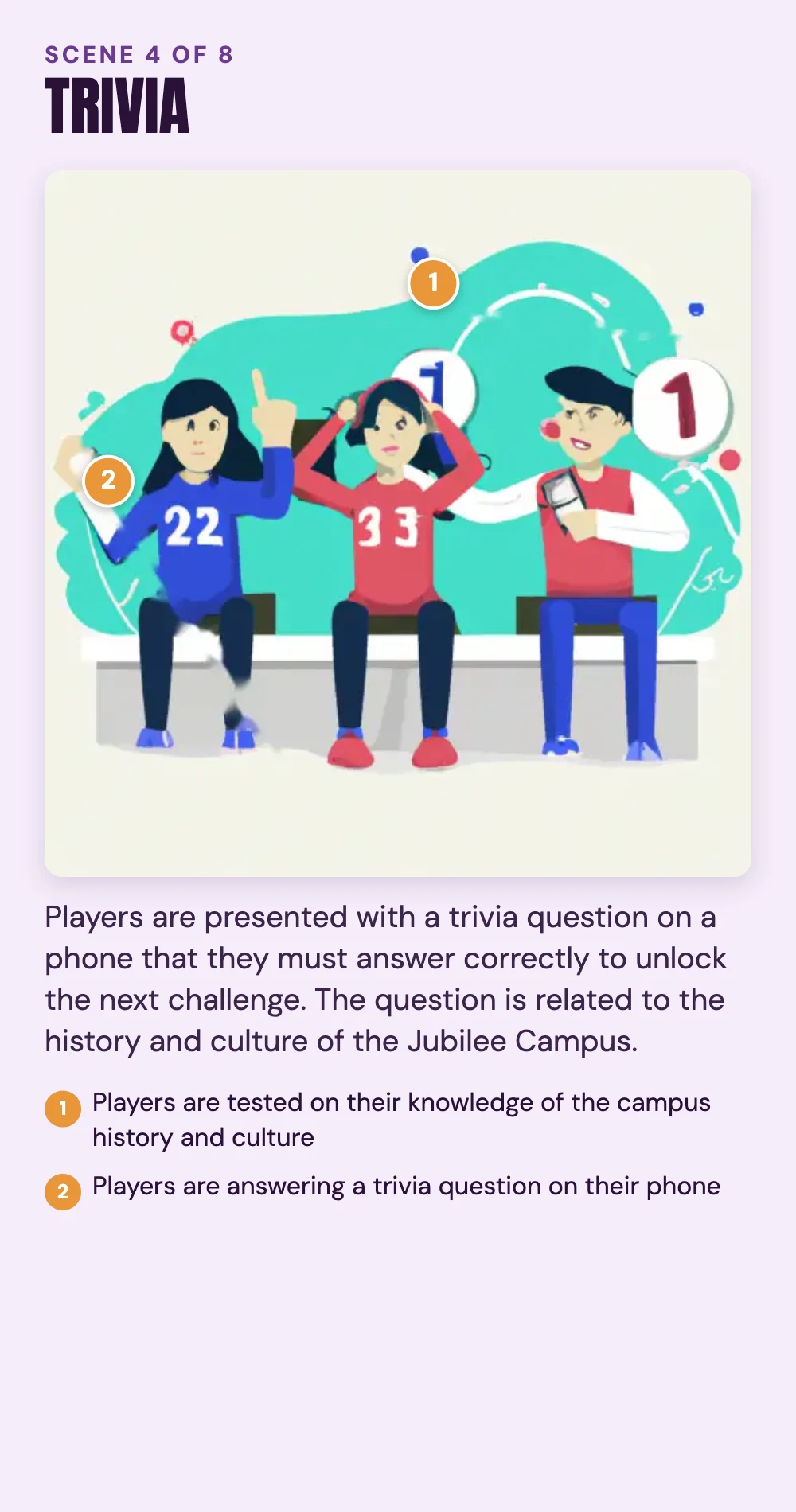


My storyboard, scene by scene. Use the arrows to move between scenes, or hover to pause.
The storyboard imagined more than I built. When it came to building, I kept the core loop (introduction, puzzles, trivia, locative media and a conclusion) and left the map, the mystery and multiplayer for later, which is exactly what the Feature Creep card warned about.
THE PLAYER JOURNEY
Here is the hunt from the player’s side: what they do at each stage, and which screens support them.
Get started at the campus entrance
WHAT THE PLAYER DOES
Opens the game, chooses a difficulty and reads how to play
SCREENS
Start, Difficulty, Instructions
Find the next building
WHAT THE PLAYER DOES
Listens to the clue and walks to the named building, looking for its Artcode
SCREENS
Audio clue
Scan and listen
WHAT THE PLAYER DOES
Scans the Artcode and hears the story behind the building
SCREENS
Location
Solve and move on
WHAT THE PLAYER DOES
Answers a puzzle or trivia question about what they just heard
SCREENS
Challenge
Finish the quest
WHAT THE PLAYER DOES
Completes the final stop at the Jubilee Sports Centre
SCREENS
End
Testing later showed that “Scan and listen” was the weak point: the phone failed to scan several times, and the prototype was slow to respond.
THE DESIGN
THE GAME LOOP
Listen: an audio clue sends the player to a named building.
Scan: they find the Artcode near the entrance and scan it with their phone.
Learn: a short audio clip tells the story behind the building.
Solve: a question checks what they heard and unlocks the next clue.
USER FLOW
13 frames in Figma
BEFORE THE HUNT
1
Start
Title screen
2
Choose difficulty
Easy, medium or hard
3
Read instructions
How to play
AT EACH STOP
Repeats at each of the 3 building stops
4
Audio clue
Where to go next
Walk and find the Artcode
In the real world
Scan the Artcode
Artcodes app
5
Location
Story of the building
6
Challenge
Puzzle or trivia
AFTER THE LAST STOP
7
End
Quest complete
Screen in the prototype
Happens in the real world
User flow: the 13 Figma frames as one journey. The middle loop repeats at each of the three building stops.


The final screens, in order of play
The route: four stops across Jubilee Campus (the entrance plus three buildings), with a challenge at each building. Swipe sideways to explore, or tap the map to open it full size.
Campus entrance
WHAT THE PLAYER HEARS
A welcome and the first clue
CHALLENGE
Head to the first building
Djanogly Learning Resource Centre
WHAT THE PLAYER HEARS
The story of Sir Harry Djanogly
CHALLENGE
Unscramble “GYJONDAL GROUP” into the company he founded
Sir Colin Campbell Building
WHAT THE PLAYER HEARS
A former Vice-Chancellor of the university
CHALLENGE
Trivia: what he did for Jubilee Campus
Jubilee Sports Centre
WHAT THE PLAYER HEARS
The final clue
CHALLENGE
Trivia: how many badminton courts the centre has
KEY DESIGN DECISIONS
Artcodes instead of QR codes: Artcodes can be drawn as pictures, so each code could show the building it belongs to and double as a hint. The trade-off: scanning proved unreliable in testing.
Audio for the story: audio cues tell players where to look, so the campus itself guides them. The trade-off: audio is easy to miss in noisy spots, so I planned subtitles or visual cues.
Wizard of Oz for the audio: Figma can’t play sound, so I played each clip myself at the right moment. It let me test the full experience without writing code.
Four stops, three challenges: a short route keeps the walk manageable and the game focused, following the Feature Creep card.
Instructions before the hunt: players learn the rules once, at the entrance, so each stop can stay short.
Test where the game lives: testing on campus, at the real stops, shows problems a desk test would hide, like codes that won’t scan on site.
CODES THAT LOOK LIKE THE CAMPUS
Artcodes are visual codes that the Artcodes app recognises by their structure rather than a fixed pattern, so they can be drawn as pictures. Instead of placing QR codes around campus, I drew three of the codes as the campus buildings they belong to, and one as the university crest, so the code itself hints at where you are.
My four hand-drawn Artcodes
I drew them in Sketchbook on an iPad Pro, varying pen sizes so that each one stayed unique and detectable, then registered them in the Artcodes app on a Samsung Galaxy Note 10 Lite.
BUILDING IT WITHOUT CODE
I wrote the game script first, sketched rough drafts of the screens, then designed the interface in Figma and linked every Artcode to its place in the flow. The audio script went through a text-to-speech tool, and the printed codes went up at the real locations, each checked for visibility and a sensible walk from the last.
13 FRAMES IN FIGMA
Start, difficulty and instructions
3 audio clues
3 challenge questions
3 location screens
An end screen
FAKING WHAT I COULDN’T BUILD
Figma doesn’t play audio, so I used a Wizard of Oz technique: during testing I played each clip myself at the right moment. The codes, links and buttons worked for real. Being clear about which parts were simulated kept the test honest.
TESTING ON CAMPUS
I ran a field test with one participant, who played through the game at its real locations around Jubilee Campus. They were briefed on safety and signed a consent form, and no faces were captured in photos or video.
The phone stopped scanning the Artcodes several times
WHY IT MATTERS
Players get stuck at the one step that unlocks everything else
WHAT I WOULD CHANGE
Clearer scanning instructions, and another way to trigger each stop
The prototype was slow to respond
WHY IT MATTERS
A slow response feels like a failure
WHAT I WOULD CHANGE
Optimise the prototype for different device types
One participant is a pilot, not proof. It was enough to show where the experience breaks, which is what an early prototype is for.
WHAT I LEARNED
Affordances carry the experience: the audio cues told players where to look, so the campus itself became part of the interface.
Instructions and feedback matter at every step: I built them into the screens, and testing showed scanning still needed better guidance.
Design for access from the start: a game built on looking at things leaves out people who can’t rely on sight. Next time I would add audio instructions and another way to trigger each stop.
GUIDELINES I’D GIVE THE NEXT DESIGNER
Use affordances to suggest how people can interact
Make the prototype accessible to people with disabilities
Give clear instructions and feedback
Explore alternative ways to interact
LET’S TALK.
I’m looking for product and UX design roles in Mumbai, remote, or where relocation makes sense. I reply within a day.
© 2026 Hiral Mamaniya
Designed and built in Framer